Homelab
My Homelab Journey in 2024
At the beginning of 2024, I decided to step into the world of homelabbing. My goal was to bring my services out of the cloud and host them locally, giving me more control, privacy, and flexibility. I started with a Lenovo M720Q, equipped with an Intel i5-8500T, 16GB of RAM, and a 1TB hard drive. This initial setup was enough to move my website and password manager away from AWS.
Since then, self-hosting has opened up many opportunities for me, and I now run a wide variety of services at home.
Services I Currently Host
- ActualBudget – Personal finance and budgeting
- Arr Stack – Automated TV and movie downloading (Sonarr, Radarr, etc.)
- Authentik – Identity provider for authentication and SSO (I use this to front most my internet facing apps)
- BentoPDF – PDF conversion and manipulation tool
- Checkmate – Site monitoring / UptimeKuma alternative
- Checkmk – Comprehensive IT infrastructure monitoring
- DokuWiki – Internal knowledgebase
- Domain Locker – Domain management and monitoring
- Donetick – Self-hosted to-do and task management
- Frigate – NVR with real-time object detection for cameras
- Gathio – Event planning and RSVP platform
- Ghost – Modern open-source publishing platform(what this is hosted with!)
- Gitea – Self-hosted Git service for code and pipelines
- Glance – RSS reader and other widgets
- Grafana Monitoring – Metrics visualization and alerting
- Home Assistant – Smart home automation
- Immich – Alternative to Google Photos
- IT Tools – Web-based utilities for networking, encoding, and more
- Jellyfin – Media server for local content
- Journiv – Personal journaling and note-taking app
- Komodo – Container orchestration and testing environment
- Mealie – Recipe management
- Nextcloud – Private cloud storage and collaboration suite
- n8n – Workflow automation and integration platform
- NTFY – Push notifications
- Ollama – Local LLM (AI model) serving and management
- OpenWebUI – Web interface for managing AI models
- pfSense – Virtual firewall and reverse proxy
- phpIPAM – IP address management
- Pi-hole – DNS service with ad blocking capabilities(not using this at the moment. Currently using Techtitium instead)
- PRTG – Infrastructure monitoring and alerting
- Zabbix – Infrastructure monitoring and alerting
- Semaphore – Open source CI/CD and automation platform(using this to learn terraform and ansible)
- Searxng – Privacy-friendly search engine
- Telegraf – Metrics collection agent for monitoring
- Technitium – DNS server with advanced management features
- TrueNAS – FTPS-based configuration backups for Wordpress and HomeAssistant
- Unifi Console – WiFi access point management
- Uptime Kuma – Website and service monitoring
- Vaultwarden – Lightweight Bitwarden-compatible password manager
- Vector – Logging pipeline for observability and monitoring used to log Pfsense into Axiom
- Veeam – Backup and recovery
- Whisper – Speech-to-text transcription service
- Wishlist – Simple wish list and gift app
- WordPress – Hosts this website and another for a family member
Infrastructure and Virtualization
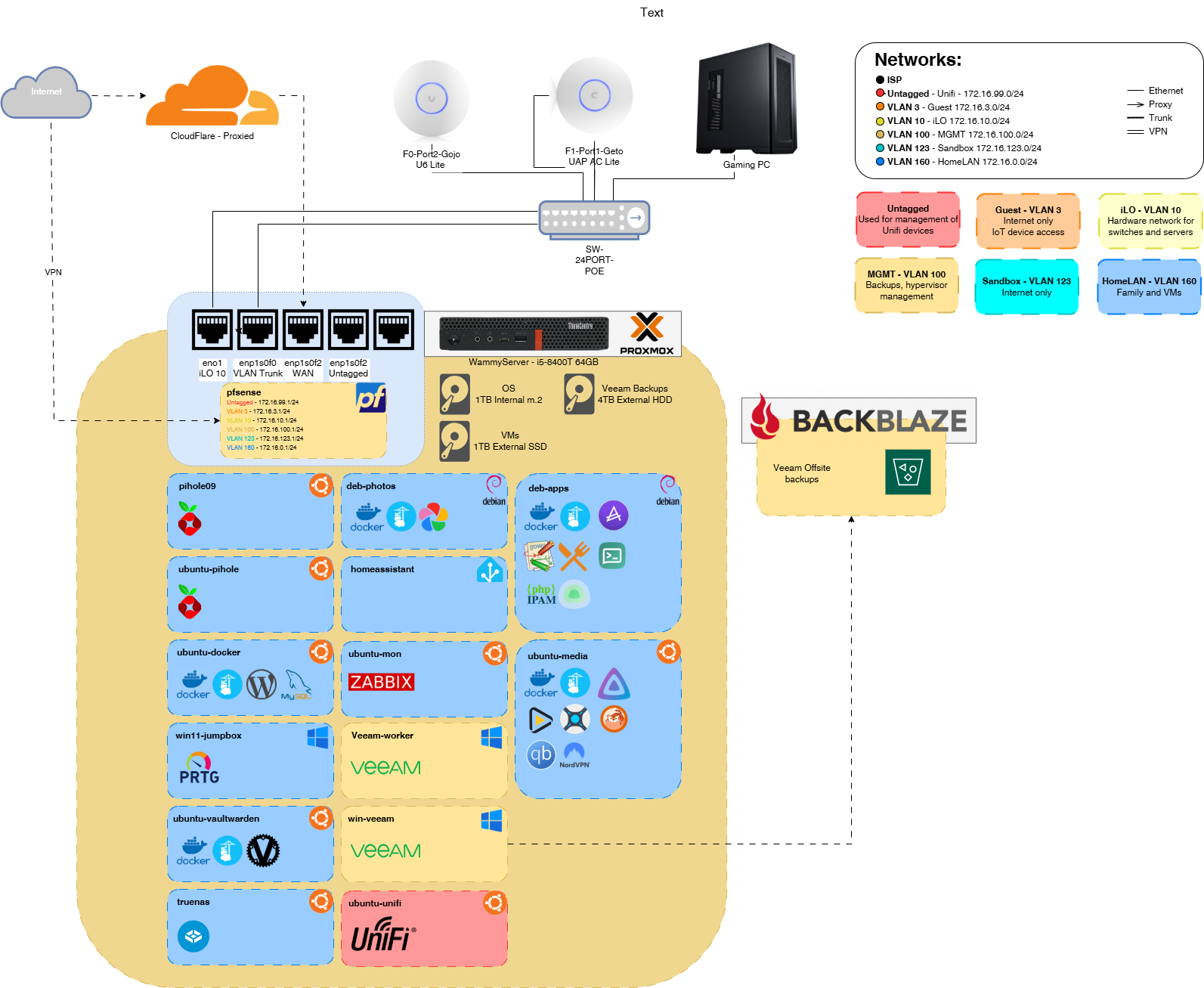
Initially, running all these services on 16GB of memory was limiting, so I upgraded to 64GB. This upgrade made a huge difference in performance and allowed me to experiment with more resource-intensive services and virtual machines. I use Proxmox as my hypervisor, which provides a flexible and user-friendly interface for managing my VMs and containers. My environment is a mix of Debian, Ubuntu, and Windows virtual machines, each chosen for their strengths and compatibility with the services I want to run.
Proxmox’s web interface makes it easy to snapshot, back up, and restore VMs, which has saved me more than once when testing new configurations or updates. Over time, I’ve learned the value of separating critical infrastructure onto different nodes or VMs to minimize downtime during maintenance or upgrades.
Network and Storage Setup
Homelabbing gave me the opportunity to experiment with VLANs, network segmentation, and more advanced routing. Replacing my ISP’s default router with pfSense was a game changer for both security and flexibility. To do this properly, I installed a 4-port PCIe NIC, which allowed me to physically separate different parts of my network (for example, separating IoT devices from my main LAN and lab environments).
Storage was another area that evolved quickly. Since the original 1TB HDD was occupying the PCI slot, I migrated my storage to a new layout:
- 1TB M.2 SSD for the operating system (fast boot and VM performance)
- 1TB USB external SSD for active projects and frequently accessed data
- 4TB USB external HDD for bulk storage, media, and backups
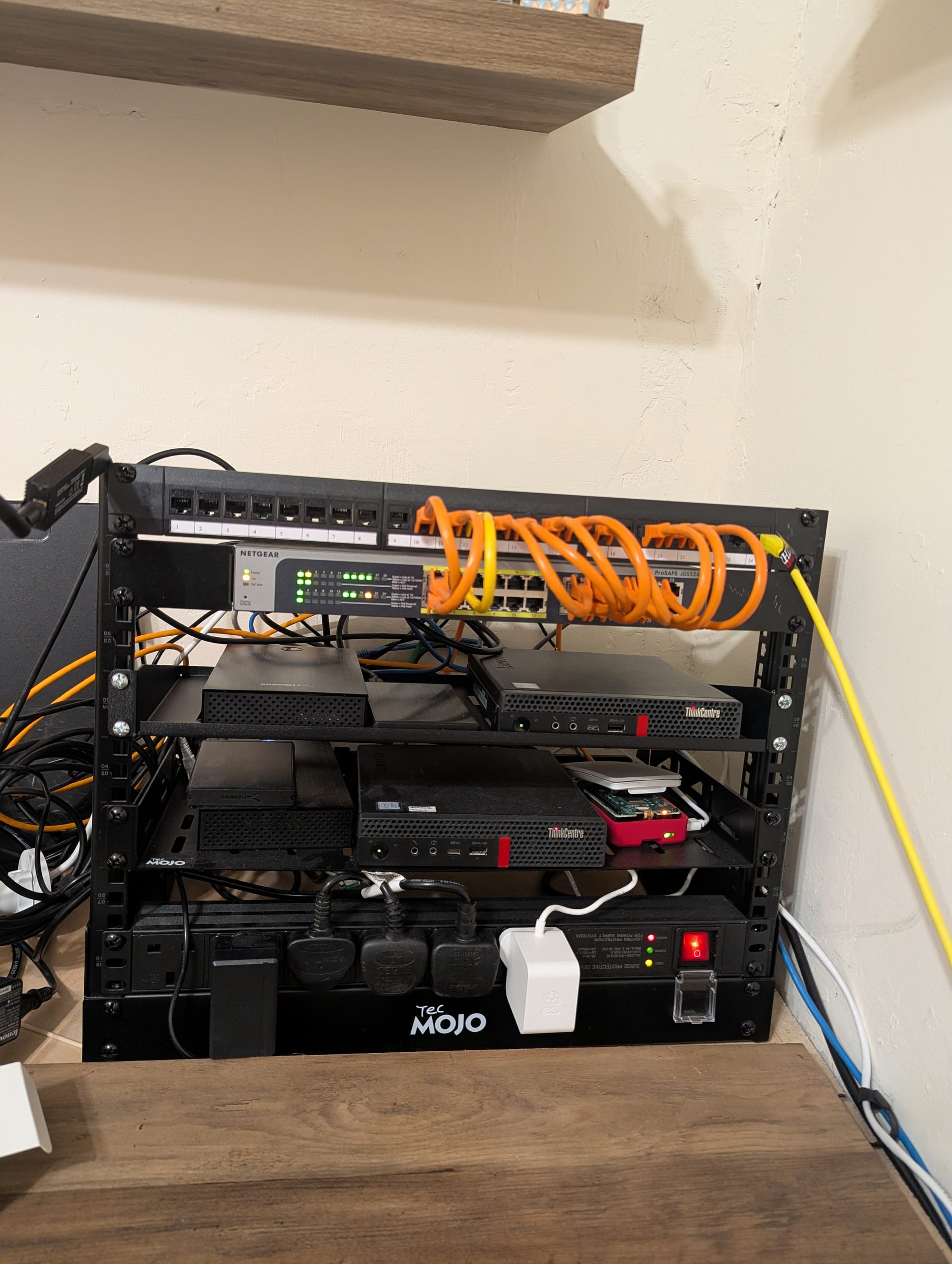
I have a second identical server, which is where my Veeam console lives. This secondary node runs anything that is high-availability (HA), such as DNS and services I can afford to lose temporarily without major disruption. While I haven’t implemented RAID yet, I back up all virtual machines daily to a different drive, copy them to the second server, and replicate them to a BackBlaze S3-compatible bucket for offsite redundancy. This multi-layered backup approach gives me peace of mind and has already saved me from accidental deletions and failed updates.
Experimenting with VLANs and pfSense has also helped me learn a lot about enterprise networking concepts, which I’ve been able to apply to both my homelab and professional work.
Remote Access and Security
Security and remote access are top priorities in my homelab. All externally-facing services are proxied through Cloudflare, which provides DDoS protection, SSL termination, and hides my real IP address. My firewall is locked down to only accept inbound connections from Cloudflare, significantly reducing my public exposure. The only exception is an OpenVPN instance, which allows secure remote management when I’m away from home.
Internally, HAProxy runs on pfSense, handling HTTPS traffic and acting as a reverse proxy to my services. This setup allows me to use a single public IP for multiple services and makes SSL management much easier. SSL certificates are automatically managed through Let’s Encrypt using Cloudflare’s API, ensuring encryption remains current and seamless. This automation means I never have to worry about expired certificates or manual renewals!
I also use VLANs to isolate sensitive services and devices, and regularly audit my firewall rules to ensure only necessary ports are open. Having a dedicated management VLAN for infrastructure devices (like switches, access points, and the Proxmox host) adds another layer of security. Over time, I’ve learned that a layered approach—combining network segmentation, strong authentication, and automated certificate management—provides the best balance of convenience and protection.
GitOps and Automation with Gitea, Renate, and Komodo
One of the most transformative improvements in my homelab has been adopting a GitOps workflow using Gitea, Renovate, and Komodo. Gitea serves as my self-hosted Git platform, where I manage all my infrastructure-as-code, Docker Compose files, and configuration repositories. Having everything version-controlled in git means I can easily track changes and roll back mistakes if needed.
To streamline updates, I use Renovate, a bot that automatically creates pull requests for all my container images whenever new versions are available. This means I no longer have to manually check for updates or worry about running outdated software. Renovate’s PRs are ready for me to review, approve, and merge—giving me full control over what gets deployed and when.
Once a pull request is merged in Gitea, Komodo takes over. It detects the changes and automatically pulls the latest code, updating my containers with zero manual intervention. This automation has been a huge time saver, reducing the risk of human error and ensuring my services are always up to date and secure.
Adopting this workflow has not only improved my security and efficiency, but it’s also helped me develop a much deeper understanding of Git, pull requests, and source control best practices. I now have a reliable, auditable, and repeatable process for managing my homelab infrastructure—something I never had when I was doing everything by hand.
In the following posts, I’ll go into detail on each service—how I’ve configured them, what they do, and how they fit into the broader homelab environment.